
Turn a product name into a controlled technical request
Selection becomes reliable when buyers separate three things: the function the product must perform, the interfaces it cannot change, and the operating envelope it must survive. A model number or photograph can help route the enquiry, but the released configuration should be traceable to measurable data and a defined duty. This is especially important for replacements: a familiar catalogue designation can hide a changed shaft, mount, port, gear geometry or process condition that only a drawing or measurement will reveal.
Use this page as the common selection worksheet for chain, sprocket, gear, gearbox, shaft, hydraulic cylinder and complete-equipment enquiries.
Describe the function and load path
Write what the component or equipment does in the system, where energy enters, where it leaves and what happens during startup, shutdown, reversing, plugging, turning, batch changes or other transients. The normal condition and the credible peak should be recorded separately. If the consequence of failure is high, state the protection or redundancy objective as part of the requirement.
Mechanical
Torque, speed, ratio, radial/axial loads, shock and alignment.
Hydraulic
Force, pressure, stroke, speed, mount geometry, ports and contamination.
Process / thermal
Flow, composition, pressure, temperature, utilities, controls and emissions/result.
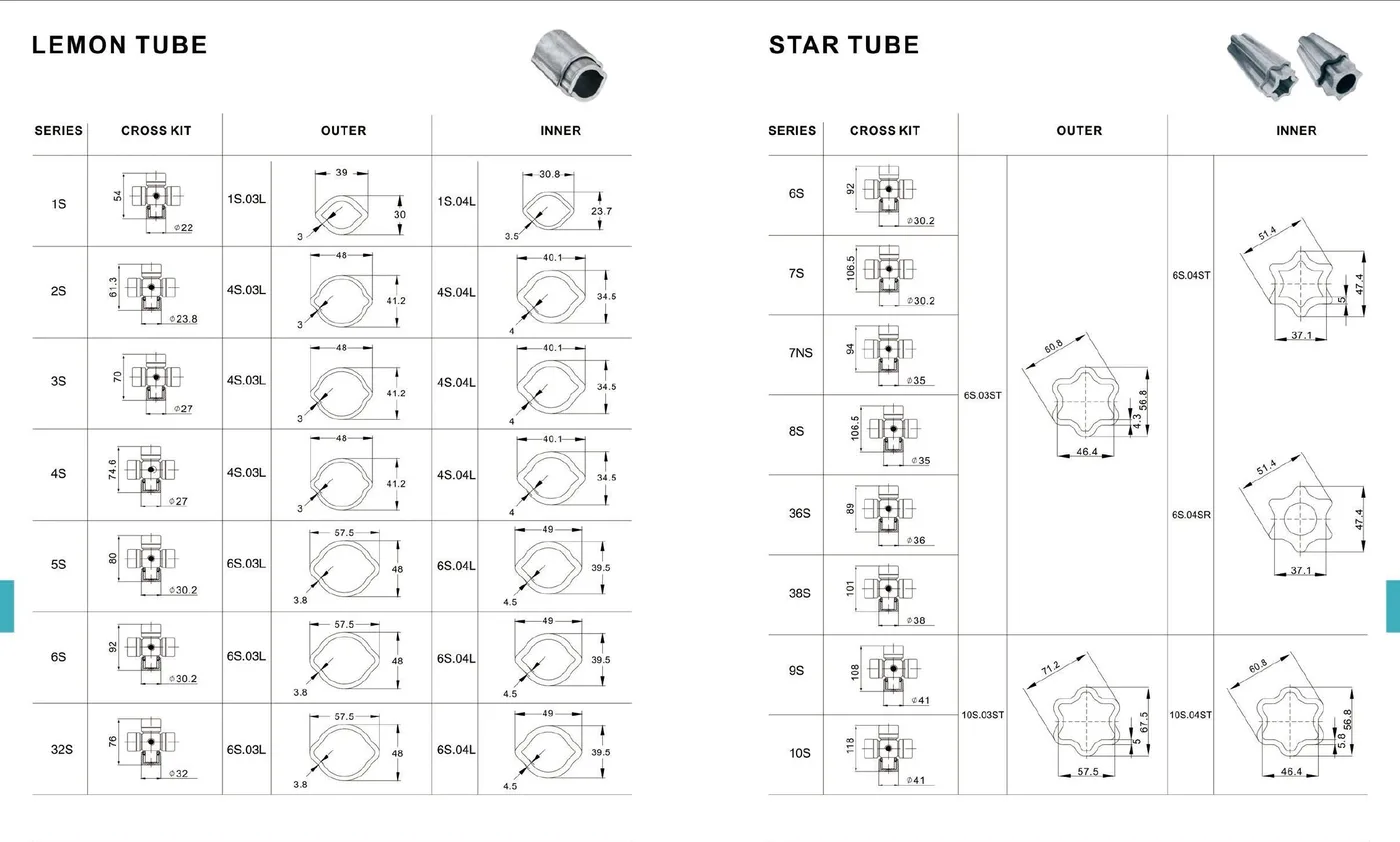
Dimensions need datums, not visual estimates
Identify the shaft, bore, spline, flange, hub, mount, pin center, port, duct, electrical or control boundary that cannot change. Use a drawing where possible. When measurements come from the installed machine, show the datum and unit and record whether the value is direct, derived or estimated. A photograph is useful for orientation, but hidden shoulders and movement through the working envelope can still control fit.
For moving assemblies such as PTO shafts and cylinders, record minimum and maximum geometry, not only the parked position.
Select the family before the exact model
Once duty and interfaces are known, the product family can be narrowed. Chain selection can move between roller, conveyor, agricultural, leaf or engineering families; a gearbox may be worm, planetary, helical or agricultural; a shaft may require a standard PTO arrangement, wide-angle joint or industrial cardan architecture. Complete equipment should be chosen from process/machine duty rather than by appearance.
- Family / architecture
- Supported catalogue series
- Required custom interface
- Unknown values marked for confirmation
Review environment, protection and service
Temperature, dust, moisture, washdown, corrosion, process chemicals, lubrication frequency, filtration, guarding, access and maintenance skill can change a technically possible selection into an unsuitable one. Protection devices should also be tied to a failure mode: a torque limiter protects against a different event from a guard, filter, relief valve or process safety interlock.
Release and acceptance
The quotation should identify what is proposed, what remains to be confirmed and what drawing or scope document controls the order. Before production, agree the revision, critical interfaces, material/finish or process requirements that matter, and the inspection or functional checks used for acceptance. This avoids purchase orders that contain many copied specifications but still omit the one dimension that controls installation.
| Field | What to record | Status |
|---|---|---|
| Duty | Normal range plus credible peak/transient | Confirmed / derived / open |
| Interfaces | Drawing dimensions, connection standard and envelope | Confirmed / measured / open |
| Environment | Temperature, contamination, corrosion, utilities | Known / range / open |
| Acceptance | Drawing revision, inspection and functional check | Required / optional / open |
Ask these before approving a like-for-like replacement
Why did the previous unit fail?
Separate wear or damage caused by the component from alignment, overload, contamination, installation or upstream-machine conditions.
Did the machine geometry change?
Verify shafts, mounts, centers, ports and working movement even when the old model number is known.
Are the units and datums explicit?
A number without a unit or datum can create a false sense of precision.
Which document controls the order?
Use one released drawing/configuration or scope document and record revisions instead of relying on email fragments.
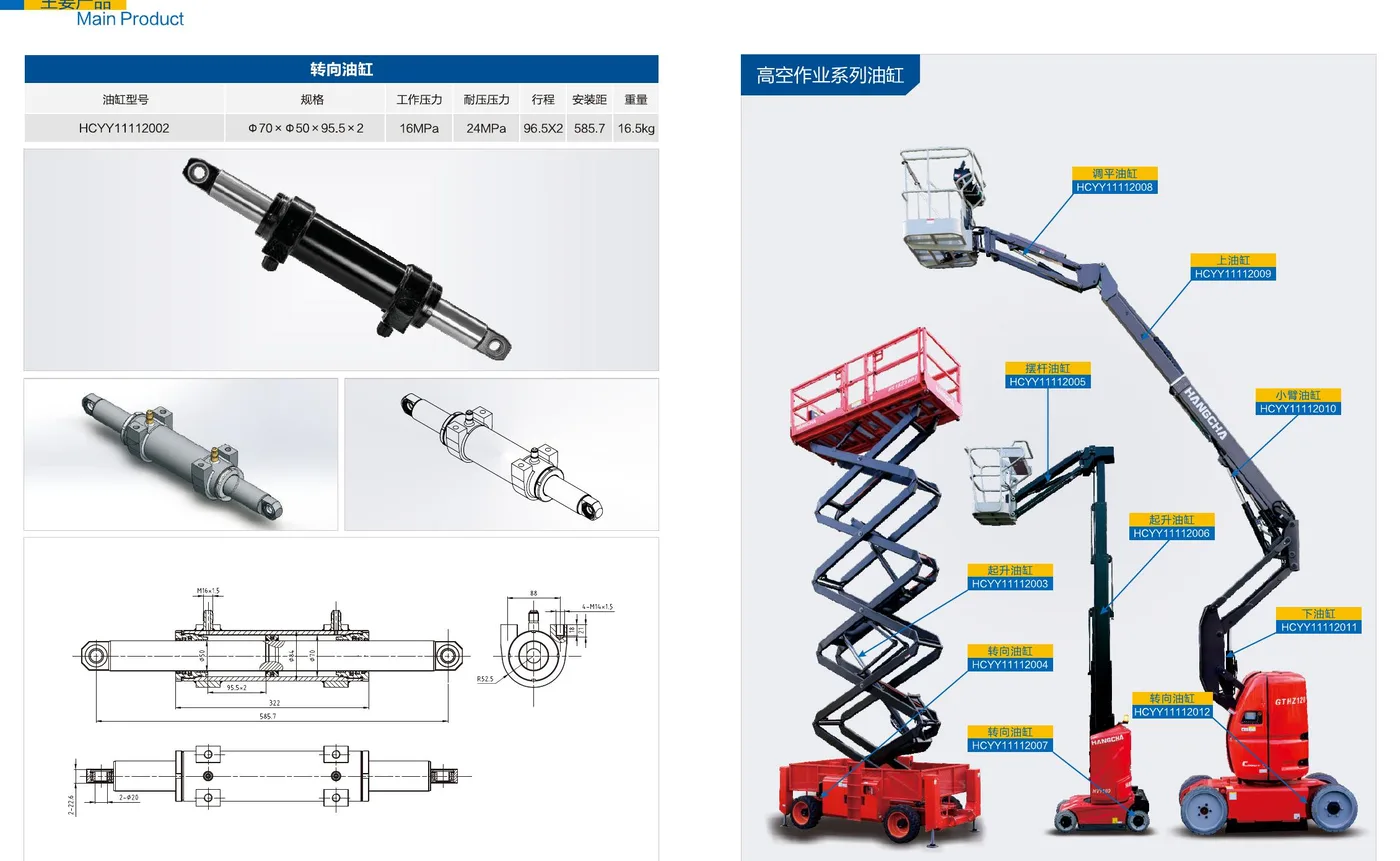

The same documentation discipline applies to very different products
A gear may need tooth geometry and accuracy, a PTO shaft needs moving length and articulation, a cylinder needs mount centers and ports, and an RTO needs a gas-stream definition. The technical fields are different, but the release logic is the same: identify the function, record the duty, freeze interfaces, list the operating environment, select a supported family and agree what document controls the final configuration.
That shared logic is why the site uses one global engineering RFQ workflow instead of a separate generic contact form for every product. Product and application pages add the family-specific questions; the footer form gives the buyer one place to submit the combined package.
Compare technical scope before price
When offers arrive, compare whether they are based on the same duty and interfaces. One supplier may include a bush, guard, torque limiter, heat-recovery module, control panel or inspection document that another excludes. Mark those scope differences before comparing commercial totals. If a quotation uses a different product architecture, ask how it satisfies the same operating basis rather than forcing names to match.
A good technical comparison sheet lists the offered model/family, critical interfaces, normal and peak duty, included accessories or controls, open confirmation items, controlling drawing/scope and acceptance evidence. Commercial negotiation is easier after those fields are aligned because differences no longer hide inside product descriptions.
A compact record for the quotation and purchase order
Before approval, put the essential selection basis on one page. The purpose is not to duplicate a full calculation; it is to make the configuration traceable. Record the machine/process, proposed family/model, drawing revision, normal and peak duty, interfaces, environment, selected options, open confirmation items and acceptance evidence. If a value changes after the quotation, update the worksheet and the controlling drawing together.
For components, note which mating item controls the geometry—for example the chain and shaft around a sprocket, the mating rack around a pinion, or the tractor and implement around a PTO shaft. For complete equipment, note which inlet/feed/exhaust or utility data control the process design. This makes it clear when a changed upstream assumption requires the product selection to be reviewed again.
Use the engineering RFQ form when the worksheet is ready. Attach the latest drawings and mark any value that still needs supplier confirmation.